What the page actually exposes
- Positioning and audience language
- Prices and billing periods
- Checkout, ad, affiliate, and sales signals
- Public pricing routes and technology clues
Evidence-backed site intelligence
See what a site does, how it earns, what it charges, and which adjacent ideas deserve a test.
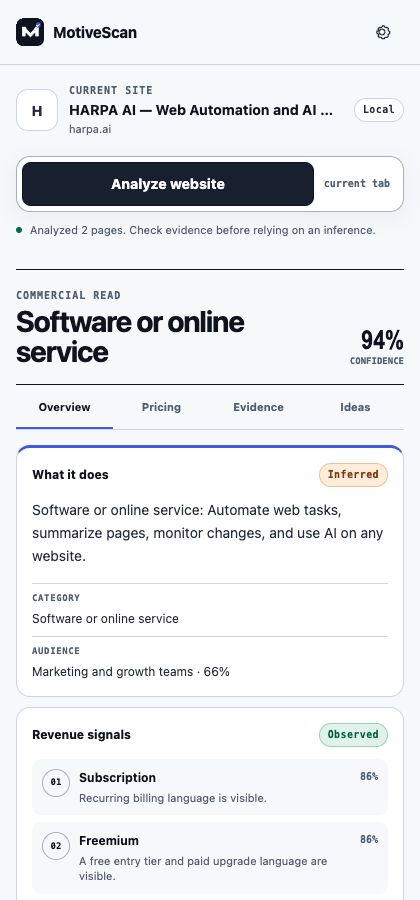 01 Claim state
02 Source trail
03 Confidence
01 Claim state
02 Source trail
03 Confidence
The method
Most page summarizers compress copy. MotiveScan reconstructs the commercial system and shows where each conclusion came from.
Research workbench
Built for unfamiliar SaaS products, tools, stores, directories, and content businesses—not for pretending every page is a startup.
Plain-language explanation of the product, category, audience, and primary promise.
Subscription, purchase, marketplace, advertising, affiliate, donation, or sales-led evidence.
Visible prices plus up to four public same-site pricing pages requested without cookies.
Source link, excerpt, fact state, and confidence for conclusions that matter.
Comparison, calculator, monitoring, workflow, and export ideas framed as hypotheses.
Local history plus Markdown and JSON exports for research notes or further analysis.
Three steps
MotiveScan waits. It does not collect browsing history or scan every tab.
The extension reads the current tab and, if enabled, public pricing routes on that origin.
Follow sources, challenge low-confidence inference, and export only what survives review.
Open core, optional service
The local analyzer stays usable without an account or subscription. Pro checkout opens only after the payment and license path is verified.
Chrome Web Store extension
The source repository and Store listing will appear here after their public release states are verified.
Managed AI service
Checkout is not enabled on this deployment.
A better first question